Two engines that sit close to the way small pixel teams work reached major version numbers in the same week. Pyxel, the Python retro engine, shipped 3.0.0 on 5 November with a 3D submodule called Pyxel Cube. Excalibur.js, the TypeScript 2D engine for the web, announced v1.0.0 on 11 November after thirteen years in development. Neither is a large commercial engine, and that is the point: both are free, open source and small enough for one person to read.
This post covers what each release actually contains, where the two differ, and what we will test before either goes near our own prototypes in Arcadian Pixels Studio.
Pyxel 3.0: retro limits, now in three dimensions
Pyxel describes itself as "a retro game engine for Python" with specifications inspired by old consoles. The official user guide lists the core limits:
- a 16-color palette (user-extensible)
- 3 image banks of 256×256 pixels
- 8 tilemaps of 256×256 tiles
- 4 sound channels with 64 definable sounds and 8 music tracks
- Windows, Mac, Linux and Web as targets
It is MIT-licensed and, as the project page notes, developed by one person.
What Pyxel Cube adds
The 3.0.0 changelog opens with one line: "Added Pyxel Cube software-rendered 3D and Blockbench model references". The Pyxel Cube guide shows how it fits the existing engine. You import pyxel.cube, build a node tree and draw the camera view onto Pyxel's 2D screen, so 2D and 3D share the same palette and frame.
The details that matter for pixel art:
- Shading through the palette. Lighting does not add colors. A shading palette maps each color index to eight brightness levels, and a level can combine two indices to produce a checkerboard dither.
- GLB models, with limits. Models and animations load from binary glTF 2.0. Textures use nearest-neighbor sampling, colors outside the palette are converted to the closest match, and skinning and morph targets are not applied, so characters are built from separate rigid parts.
- Blockbench as the recommended tool. The guide explains how to import the Pyxel palette into Blockbench and lock it, so textures are painted with the same 16 colors the game uses.
Two patch releases followed quickly. 3.0.1 (10 November) fixed texture seams on Cube spheres and removed unused vertices from GLB imports. 3.0.2 (16 November) improved 2D and Cube drawing performance and fixed tilemap collisions with fractional positions.
Excalibur 1.0: a web engine commits to stability
The Excalibur v1.0.0 announcement is candid about what the number means: "Not much, it's basically been v1 for a while." The practical change is the promise behind it. From v1 the team follows semantic versioning and treats breaking changes as bugs. The accumulated API renames ship now, with codemods and an upgrade command in the new CLI to apply them.
Excalibur is a 2D TypeScript engine with no dependencies, BSD-2-licensed, and it already reads Tiled, LDtk, SpriteFusion and Aseprite files. On npm, 1.0.0 was published on 8 November and 1.0.1 followed on 13 November.
What v1 brings
- 2D lighting: ambient, point and cone lights, with occluders that cast shadows. The team calls it the most requested feature.
- A pause system: scenes pause and resume while HUDs and menus keep running.
- Material and post-processing shader pipelines, plus a plugin API modelled on Bevy's.
- A serialization API that saves actors to JSON, which also makes an auto-save plugin short to write.
- A rebuilt sound manager with channels, mixing and spatial audio.
- GPU particles, coroutines, input mapping and A* pathfinding on tilemaps.
The pixel art mode
For our work, the most relevant line is a single option: new ex.Engine({ pixelArt: true }). The post explains the problem it solves. Plain nearest-neighbor sampling shimmers when sprites move at fractional speeds and produces fat and thin pixels on rotation, while bilinear filtering blurs everything. The pixel art sampler snaps to texel edges but antialiases the boundary between texels, based on a filter published by Inigo Quilez.
Side by side
The two engines solve different problems, and the releases make that clearer.
| Pyxel 3.0 | Excalibur 1.0 | |
|---|---|---|
| Language | Python | TypeScript |
| License | MIT | BSD-2-Clause |
| Release | 3.0.0 on 5 Nov, 3.0.2 on 16 Nov | announced 11 Nov, 1.0.1 on 13 Nov |
| Approach to pixel art | hard limits: 16 colors, 256×256 banks | free resolution, pixel art sampler |
| Headline addition | software-rendered 3D (Pyxel Cube) | 2D lighting, shader pipelines |
| Asset workflow | built-in editors, Blockbench for 3D | Tiled, LDtk, Aseprite importers |
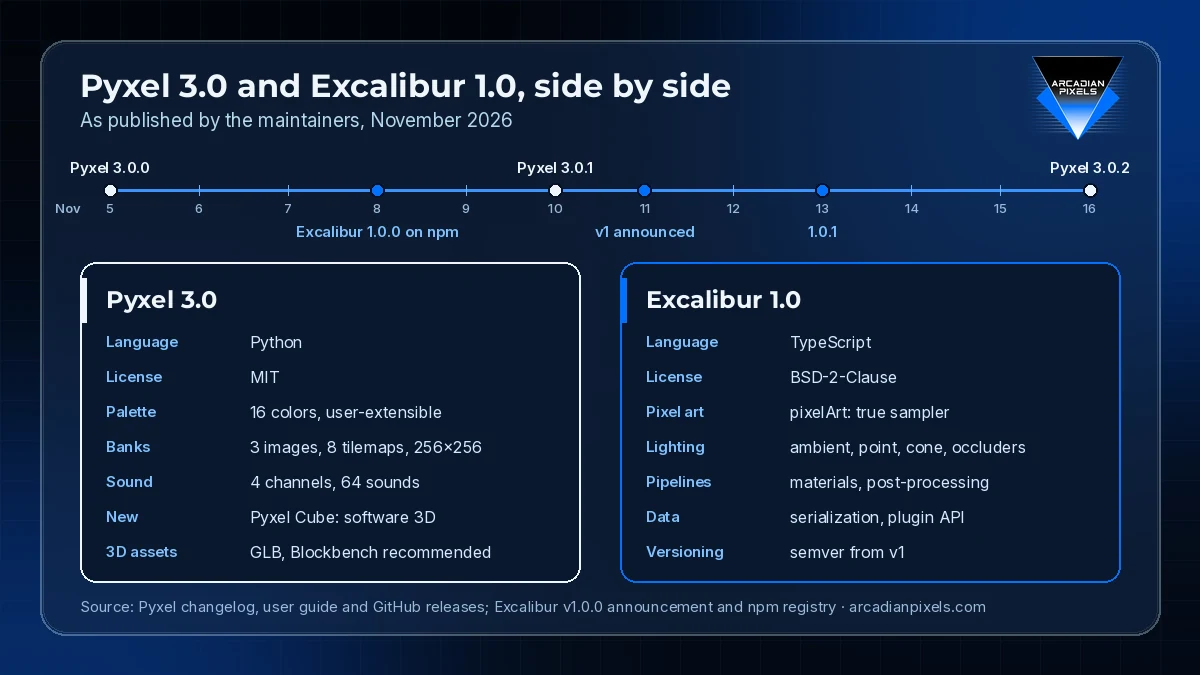
Source: Pyxel changelog, user guide and GitHub releases; Excalibur v1.0.0 announcement and npm registry, November 2026
Pyxel decides the constraints for you, which is useful for jams, teaching and projects that want a fixed look. Excalibur leaves the constraints to the team and supplies tools to keep pixels clean at any scale, which suits browser releases that must run on many screen sizes.
What we will test
Neither engine replaces our main production tools, but both cover narrow jobs well. Our notes for the next sprint:
- Pyxel Cube for small 3D scenes. We want to check whether palette-based shading with two-color dithering looks consistent next to our hand-drawn tiles, and how rigid-part animation works for simple creatures.
- Excalibur's
pixelArtmode with fractional camera movement. We will run one of our scrolling test maps with a sub-pixel camera and compare the result against plain nearest-neighbor sampling. - Migration cost. We have no Excalibur code in production. For teams that do, the
upgradecommand and codemods are the first thing to try before moving to v1. - Patch cadence. Both projects issued fixes within days of the major release. We will wait for the next round of patches before relying on either one for anything shipped.
Closing note
A version number says little about code quality. What these two releases offer is clarity: Pyxel now states where its 3D support stops, and Excalibur commits to not breaking APIs from here on. For small pixel teams, both kinds of clarity save time.
Sources: Pyxel changelog, Pyxel user guide, Pyxel Cube user guide, Pyxel releases, Excalibur v1.0.0 announcement, Excalibur on npm.