On 10 November 2026, OpenAI Supply Co. and ModRetro put the ModRetro Chromatic: Codex Edition on sale: a $200 handheld with a 160 × 144 screen, one programmable cartridge and a Codex plugin that builds Game Boy and Game Boy Color ROMs. The first batch sold out, and the store lists a restock for 19 November.
The headline is "prompt your own game". What interests us is underneath: the plugin generates ordinary GB Studio projects, compiles to ordinary .gb and .gbc files, and flashes them to a real cartridge. That makes it a new front door to a homebrew scene that has run on volunteer tools for years. This Dev Log sets out what was published, what the hardware still demands of pixel art, and how we would use it without letting it decide the art.
What was announced
The product page and the OpenAI developer blog describe three pieces.
- The handheld. A 2.56-inch IPS backlit LCD at 160 × 144 pixels, three AA batteries in the box (the ModRetro rechargeable Power Core also fits), a link cable port, an IR port, USB-C and a 3.5 mm headphone jack. It plays original Game Boy and Game Boy Color cartridges as well as Chromatic cartridges.
- The Codex Cartridge. A programmable cartridge for
.gband.gbcROMs. One comes with the handheld; extras are listed at $50. Each includes an activation code for Chromatic Developer Mode, limited to two computers and exclusive to the Codex Edition. - The plugin. The ModRetro Chromatic plugin runs inside Codex in the ChatGPT desktop app. Its marketplace listing says it is built on GB Studio and the Chromatic Firmware Updater, and that the games it creates "remain fully editable in GB Studio".
Shipping is limited to the US, Canada, Australia, New Zealand, Japan, the UK and the EU. Switzerland is not on that list, which matters to us directly.
How the pipeline works
The developer walkthrough starts with a text prompt for a small top-down game, then hands back a normal project folder: a .gbsproj file for GB Studio, an assets/ folder with sprite sheets, backgrounds and audio, and a compiled .gbc.
The useful tools
For a pixel team, four plugin features matter more than the prompt:
- Sprite sheet previews. Codex can lay out animation frames side by side, so a pose or direction can be named and rebuilt.
- Background and collision side by side. The collision map marks which tiles block movement. Reviewing art and collision in one view is a habit we already ask for in our own level work.
- Annotate a frozen frame. In the emulator preview, you click the game display, select a sprite, tile or area, and describe the change.
- Scripted input with captures. Codex can send a sequence of button presses to the emulator and capture a frame after each step. That is a cheap regression test for movement and collision.
Other routes in
The plugin is not tied to prompts. The walkthrough lists three other routes: extend a GB Studio game with GBVM or C, write the game in C and compile it with GBDK-2020's lcc, or build with an assembly toolchain such as RGBDS and hand the finished ROM to the plugin to inspect and playtest. For an experienced homebrew developer, the plugin can be just a test harness and a flasher.
The hardware still sets the rules
The constraints behind a 160 × 144 screen are strict, and no model changes them. The figures below come from the Pan Docs, the community reference for Game Boy hardware.
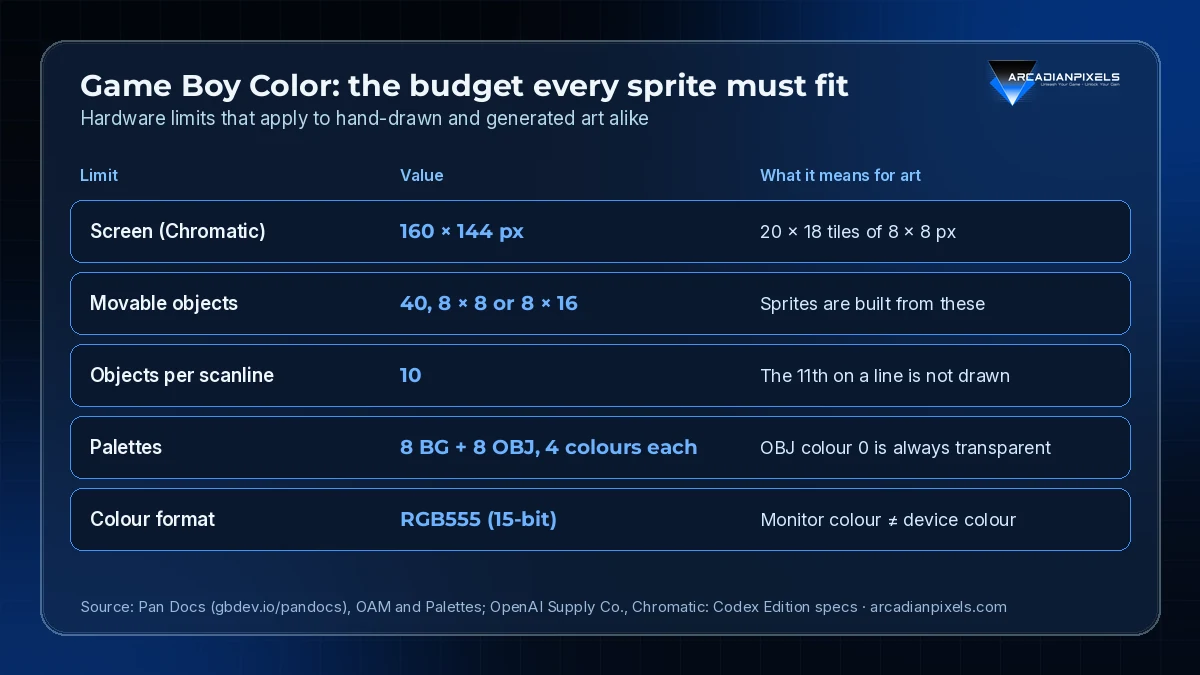
Source: Pan Docs (gbdev.io/pandocs), OAM and Palettes pages; OpenAI Supply Co. Chromatic product page · arcadianpixels.com
Three of those limits shape art more than any other:
- Ten objects per scanline. A row of enemies, a hero, and a few projectiles can hit the limit fast. Objects past the tenth are not drawn on that line. Off-screen objects still count, unless their Y position is moved off-screen.
- Three visible colours per sprite palette. Colour 0 of every object palette is transparent, so each sprite palette offers three colours. Character design starts from that number, not from a mood board.
- Colour on the device is not colour on the monitor. Pan Docs notes that the original Game Boy Color screen is not lit and that its colours mix unevenly, so values chosen on an sRGB monitor shift on real hardware. The Chromatic uses a backlit IPS panel, so the shift will differ again. Only a test on the device settles it.
A generated sprite sheet that ignores these rules will build and then flicker, lose sprites or look wrong on the panel. The scripted-input captures are a good place to catch that early.
Where we stand on generated pixel art
We will not ship pixel art drawn by a model as Arcadian Pixels art. Our characters and tiles are drawn by people, and our style rules exist because consistency across hundreds of frames is the hard part. A prompt does not replace that.
The rest of the pipeline is a different matter:
| Task | Who does it | Why |
|---|---|---|
| Sprites, tiles, palettes | Artists, by hand | Style, readability and palette budget are design decisions |
| Collision maps and scene wiring | Shared, reviewed in GB Studio | Side-by-side views make errors visible |
| Input sequences and frame captures | Tooling | Repeatable checks after every rebuild |
| Flashing test builds | Tooling | One step from ROM to cartridge |
Two warnings from the walkthrough deserve a place in any studio checklist. Writing a ROM erases the game on that cartridge and can erase its saves, and the installer makes no backup. Before cartridge play, the firmware must be updated and Developer Mode activated on the computer that will connect to the handheld.
The same week in Aseprite
The pattern is not limited to Codex. On 11 November, Icefox Lab released IcefoxPixel 1.0, a Windows extension that connects a local AI agent to Aseprite through MCP so it can edit sprites, layers and animation frames. The author is candid about limits: only the Codex workflow was tested with real canvas edits, and "results need visual review and revision". We read that as the right framing for every tool in this category.
What we will check
Before any of this touches an Arcadian Pixels branch, we want answers to four questions:
- Round-trip editing. Does a GB Studio project created by the plugin open, save and rebuild cleanly in the standalone GB Studio editor, without the plugin?
- Hand-drawn assets in. Can we drop our own sprite sheets and palettes into the generated project and keep the plugin's preview and test tools?
- Availability for us. With no shipping to Switzerland listed, can a team here obtain the hardware and activation codes through a normal route?
- Cartridge handling. Is there a safe way to back up saves before flashing, given the installer does not?
If the answers hold up, the plugin's test and flashing tools could earn a place next to our existing toolchain. The art stays ours.